
AGPM Replacement
AGPM support ended in April 2026.
Your change control does not have to.
Controlled editing, approval, version history and rollback all have direct equivalents in Universal Policy Administrator — in a browser, across every domain you run, without Software Assurance. Existing versions, comments and history migrate with it.
Extended Support Ended
14 April 2026
The date Microsoft published for the end of extended support for MDOP, the pack AGPM shipped inside.
Final Release
AGPM 4.0 SP3
The last version Microsoft shipped. There is no version 5, and no successor product from Microsoft.
Documentation
Archived
Microsoft's AGPM documentation set is marked archived, with a content date of 2017.
The Situation
What actually ended, and what did not
Advanced Group Policy Management was never sold on its own. It arrived inside the Microsoft Desktop Optimization Pack, available to organisations with Software Assurance, and Microsoft describes it as a product that extends the capabilities of the Group Policy Management Console. Extended support for MDOP ended on 14 April 2026. The last release was AGPM 4.0 SP3, and the documentation set is archived.
What ended is the commitment: no security updates, no bug fixes, and no compatibility assurances against future versions of Windows Server or the Group Policy Management Console it attaches to.
What did not end is the software. Existing archives continue to run, which is why the decision is easy to defer.
No outage forces the decision. The constraint appears at the next server refresh, at an audit asking who supports your change control, or the first incident with no vendor to raise a case with. None of those are good points at which to begin evaluating replacements.
The Archive
Your history comes with you
This is the question that stalls most AGPM migrations. The archive holds years of versions, the comments recorded against each change, and the approvals attached to them. In many organisations that record exists because an auditor required it, which rules out abandoning it.
UPA imports the AGPM versions, the comments and the history. The record continues; it does not restart.
The effect outlasts the migration itself. An auditor asking in two years what changed, when and who approved it receives an answer covering the AGPM period, rather than a history starting at the cutover date and a decommissioned server retained to answer anything older.
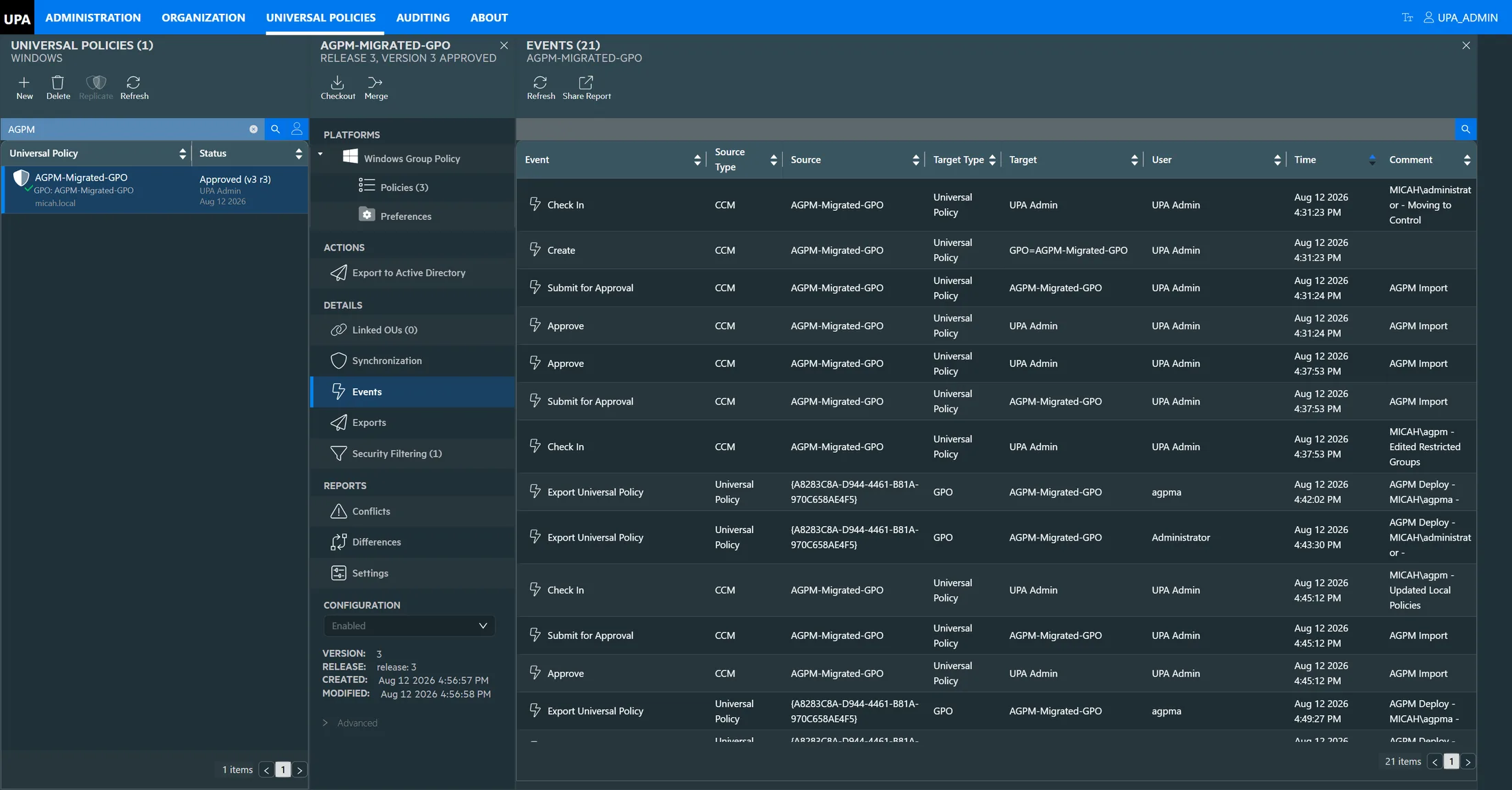
A GPO migrated out of AGPM, immediately after import. The check-in comments, the submissions, the approvals and the deployments all carried across — and the deployments are still credited to agpma, the AGPM approver who made them, rather than to the account that ran the import. Click to see the full console
Side by Side 0:34 · no sound
The same policy in both consoles: its AGPM history window, then the record UPA holds after the migration. Same timestamps, same comments, same people.
What survives the migration
Four things survive that a migration could reasonably have collapsed into a single "imported" entry:Comments
The original wording
Moving to control. Edited Restricted Groups. Updated Local Policies. Each still attached to the check-in it explained, and still prefixed with the account that wrote it.
Dates
The original timestamps
The events match the AGPM archive to the second, and they pre-date the UPA policy that holds them. The timeline is the AGPM one, not the import’s.
Lifecycle
Every step, not just the outcome
Check out, check in, submit for approval, approve, deploy — each preserved as a separate event rather than collapsed into a version number.
Roles
Who edited and who approved
The editor account appears against the changes and the approver account against the deployments, so separation of duties is still evidenced after the move.
Continuity
What carries over, concept by concept
The working model is the one your team already knows. Almost everything in AGPM has a direct counterpart here, which means the migration is a change of tooling rather than a change of practice. The routine should be recognisable to the team on the first day.
| In AGPM | In UPA | What is different |
|---|---|---|
| The archive | The policy repository | One repository covering every domain you manage, rather than an archive and a server connection per domain. |
| Versions, comments and history | Imported | They come across rather than starting again — the row most people come to this page looking for. |
| Controlled GPO | Universal Policy | The managed object of record. It can exist before any GPO does. |
| Check out and check in | Check out and check in | The same routine, with the same purpose: one editor at a time, and a comment on the way back in. |
| Editor, Approver and Reviewer roles | Scoped roles | Scoped to the policies a team actually owns, not only to the domain they sit in. |
| Difference report | Differences | Version against version, or against the live GPO in Active Directory to catch changes made outside the process. |
| Deploy | Deploy to Active Directory | Recorded against the version that was approved, with the account that ran it and the domain it landed in. |
| Roll back to a previous version | Roll back to any version | Nothing is overwritten, so recovery is a selection rather than a restore. |
| A GPMC extension on a domain-joined desktop | A browser | The one row on this table that is not a like-for-like swap — and the reason for all the others. |
This is not a proposal to adopt
change control. You already
have it.
The question is whether the next decade of it runs on a client installed on desktops.
The Difference
What you gain beyond a like-for-like replacement
Replicating AGPM alone would be a lateral move. Where the software runs determines what it can reach.
Reach
Every domain, including untrusted ones
Acquired forests, DMZ and isolated networks come under the same process rather than being managed manually or not at all.
Access
A browser, not an installed client
No domain-joined desktop and no jump box. Onboarding an administrator requires a URL and a role assignment.
Automation
PowerShell across every domain
Report on every setting, drive bulk changes, or schedule a nightly comparison against production.
Upkeep
One upgrade, on the server
Rather than a client rollout to every administrator each time the product moves.
And one thing worth saying plainly to anyone who has been burned by a tooling decision before: UPA deploys standard Group Policy Objects. There is no agent and no parallel enforcement channel. If it ever turned out to be the wrong call, every policy it wrote keeps working exactly as it does today, and there is nothing to unpick from Active Directory. That is a materially smaller bet than the one your organisation made last time.
Next Step
Planning the move
With the history question answered, what remains is scope: how many domains are involved, which are outside your trusts, and whether the two systems need to run in parallel during cutover. These depend on your environment rather than the product.
Provide the number of domains, the age of the archive, and what your auditors expect to see, and we will map it against what UPA does before discussing a trial.
Common Questions
AGPM end of life, answered
Ready to Elevate Your Policy Control?
Modernize Your Group Policy Management Today
Join leading enterprises in revolutionizing their policy management. Book a personalized demo to see how UPA can future-proof your operations.Web Console
100% GPO support in a modernized web console
Comprehensive Change Management
Offline changes, workflows, policy analysis, auditing
Enterprise Ready
Delegated administration, every domain, no agent