
Universal Policy Administrator Documentation
Auditing
For auditing and compliance purposes, UPA keeps a history of events performed throughout the UPA system for each user and for each policy. This provides auditors and administrators the five critical requirements:
- Who made the changes?
- What were the changes?
- When were these changes made?
- Where were they made?
- Why were the changes made?
A list of the auditing events include:
- User Login Time/Date
- Duration of Session
- Number of Events during Session
- Create Policy
- Import GPO/Domain
- Create Role, View, Permission, Delegation OU
- Checkin
- Checkout
- View Comments
- Add/Delete OU
- Link/Unlink OU
- Revert
- Update
- Delete
- Merge
- Approve
- Export
- Replicate
- Synchronize
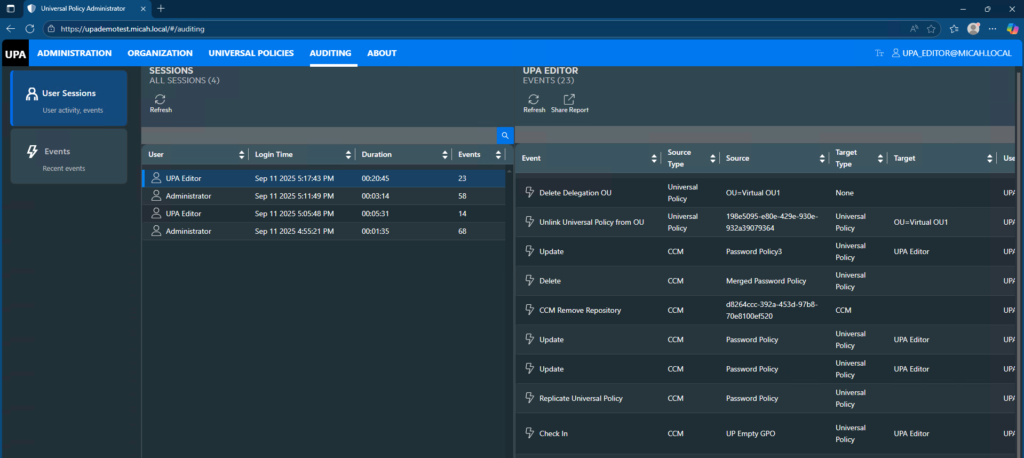
To see the User Sessions and Events:
- Log in to the Web Console as an Administrator and navigate to the Auditing tab.
- Click User Sessions and click on a User to see their activities
- Click on Events and review all the events.
- Click Share Report to print or save the report to a pdf.
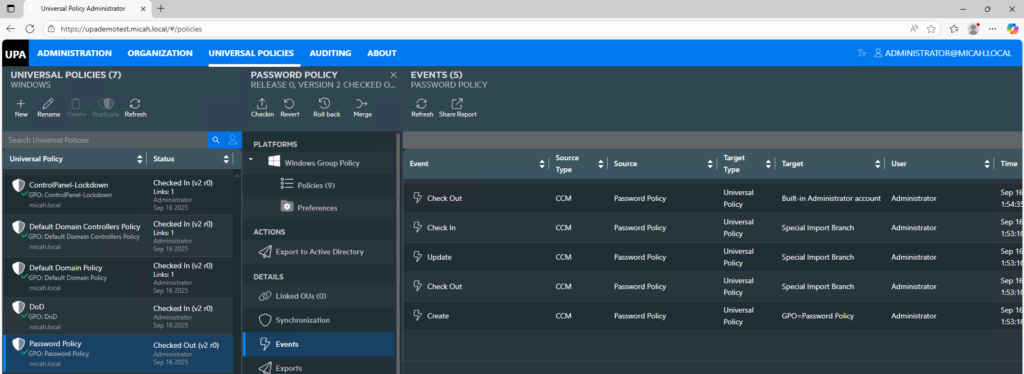
To see the events for a specific Universal Policy:
- Log in to the Web Console as an Administrator and navigate to the Universal Policies tab.
- Select the Universal Policy
- Click on Events and review all the events for that policy.
- Click Share Report to print or save the report to a pdf.
To view a video of UPA Auditing: