
Universal Policy Administrator Documentation
-
Introduction to Universal Policy Administrator
-
Installing Universal Policy Administrator
-
Setting up UPA Delegation
-
Working with Universal Policies
- Intro to Working with Universal Policies
- Creating Universal Policies
- Adding and Editing Policies
- Approving Universal Policies
- Exporting Universal Policies and Updating OU Links
- Finding and Resolving Duplicate and Conflicting Settings
- Merging Policies
- Rolling Back Policies
- Replicating Policies
- Synchronizing Policies (Gold Policy)
- Managing Security Filtering
- Working with ADMX Templates
-
Working with Domains and OUs
-
Migrating to UPA
-
Reporting on Universal Policies
-
UPA Configuration Settings
- Configuring SAML Authentication via Microsoft ENTRA ID
- Configuring UPA to use a Third-Party Identity Provider
- Configuring OIDC Authentication with OKTA
- Configuring OIDC Authentication with Microsoft Entra ID
- Configuring SAML authentication with Okta
- Configuring the Universal Policy Administrator Syslog Provider
-
Appendix
- Working with Citrix Policies
- Troubleshooting
- Domain Import – Skipping GPOs
- Adding an Additional Group with Read, Write, or Modify Security to a GPO
- Updating the UPA SSL Certificates
- UPA PowerShell Cmdlets
- Updating the License File
- UPA Disaster Recovery Guide
- Change UPA Logging Level
- Uninstalling UPA
- Release Notes
< All Topics
Print
Event History Report
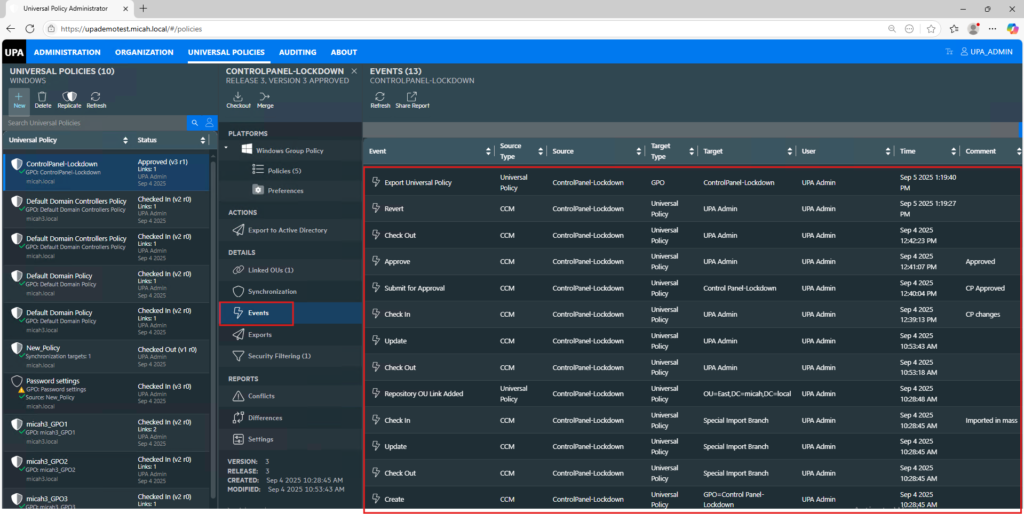
You can view the history of events for each policy. This helps with auditing and troubleshooting.
To view the history of events for a Universal Policy:
- Navigate to the Universal Policies tab.
- Select a Universal Policy.
- Click Events in the Details section.
- In the Settings Report tab, click on the release of the Universal Policy.
- View (and Search) the Universal Policy Events.
- Click Share Report to print or save the list of events to a pdf. If you only want to print out a selection of the events, search on a specific type of event (e.g., export) and then click Share Report.
In This Article