
Universal Policy Administrator Documentation
Conflict Analysis Report
A Conflict Analysis Report shows any other Universal Policies that have the same settings as this Universal Policy but have one or more values on that setting that differ. Universal Policies with identical settings do not appear in this report. This feature is helpful to clean up and consolidate policies.
To identify policy conflicts:
- Navigate to the Universal Policies tab.
- Select a Universal Policy.
- Click Conflicts in the Reports section.
- View (and Search) the conflicts (if any exist)
- Click Share Report to print or save the list of conflicts events to a pdf.
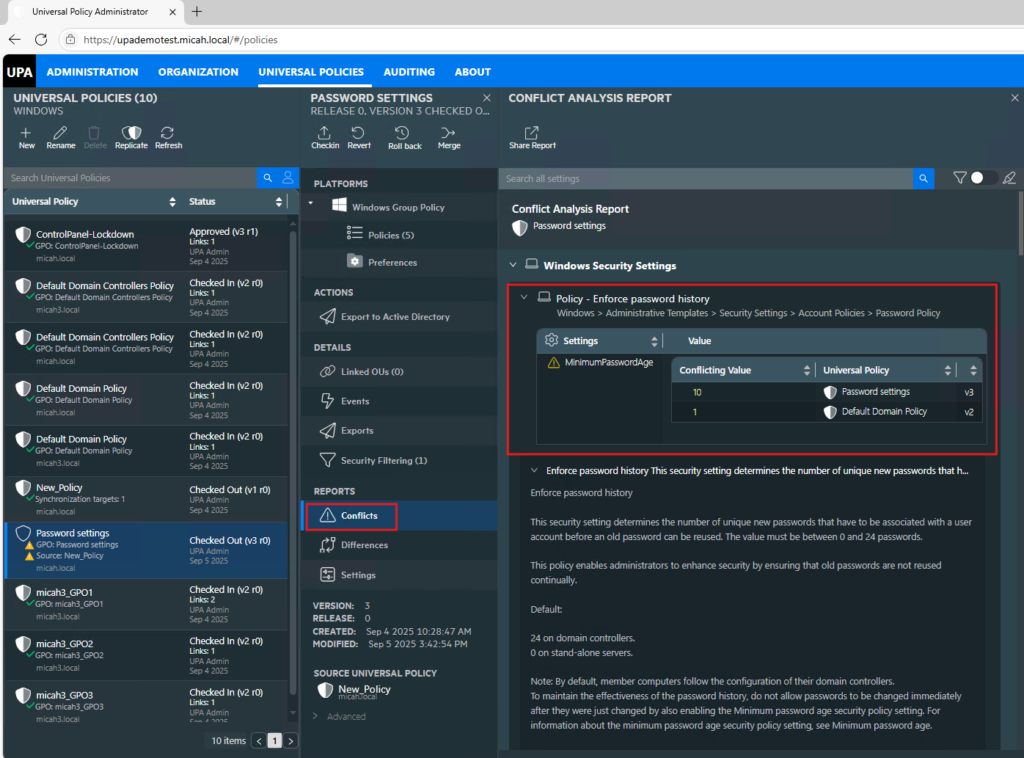
To Search Specific Settings in the Conflict Analysis Report in the Web Console:
- Navigate to the Universal Policies tab.
- Select a Universal Policy.
- Click Conflicts in the Reports section.
- In the Conflict Analysis Report tab, navigate to the search bar.
- Click on the search bar to activate it.
- Type in the keyword or setting name you are looking for.
- Press Enter or click on the search icon to initiate the search.
- Review the search results to find the relevant setting (The keywords are highlighted).
To Share Conflict Analysis Report in the Web Console:
- Navigate to the Universal Policies tab.
- Select a Universal Policy.
- Click Conflicts in the Reports section.
- In the Conflict Analysis Report tab, click on the Share Report icon, a print dialog box will appear.
- Choose Save as PDF or select the PDF printer option from the list of available printers.
- Click the Print or Save button. A new dialog box will prompt you to choose the destination where you want to save the PDF file.
- Select the desired location on your device and enter a file name for the PDF.
- Click Save to generate the report as a PDF file.
Setting Uniqueness For Conflicts
To effectively view and use conflict reports, it is important to understand the significance of each setting type to differentiate between uniqueness and identical settings.
Registry Based Settings
| Settings | Specifications |
|---|---|
| Registry | Hive, Key, and ValueName |
Preference Settings
| Settings | Specifications |
|---|---|
| Environment Variable Preferences | Action, VariableName, PathValue |
| File Preferences | Action, SourceFile, DestinationFile |
| Folder Preferences | Action, PathValue |
| IniFile Preferences | Action, Path, Section, Property |
| Registry Preferences | Action, Hive, Key, ValueName |
| Registry Collection Preferences | Name |
| Shortcut Preferences | Action, Location, TargetPath, TargetType, Arguments |
| DataSource Preferences | Action, DSN, UserDSN, Driver |
| Device Preferences | DeviceClass, DeviceType |
| Folder Option FileType Preferences | FileExt |
| Folder Option Global Preferences | Always unique |
| Folder Option Vista Preferences | Always unique |
| Folder Option OpenWith Preferences | Action, FileExtension |
| Local Group Preferences | Action, GroupName |
| Local User Preferences | Action, UserName |
| Network DialUp Preferences | Action, ConnectionName |
| Network VPN Preferences | Action, ConnectionName |
| Power Power Options Preferences | Always Unique |
| Power Power Scheme Preferences | Action, Name, PowerScheme |
| Power Power Plan Preferences | Name, NameGuid |
| Printer Local Preferences | Action, Name |
| Printer Port Preferences | Action, IPAddress |
| Printer Shared Preferences | Action, Path |
| Task Trigger | Type |
| Task Scheduled Preferences | Action, TaskName, AppName, Args |
| Task Immediate Preferences | TaskName, AppName, Args |
| Time Trigger | Type |
| Daily Trigger | Type, DaysInterval |
| Weekly Trigger | Type, WeeksInterval |
| Monthly Trigger | Type, MonthsOfYear, DaysOfMonth |
| MonthlyDOW Trigger | Type, MonthsOfYear, DaysOfWeek, WeeksOfMonth |
| Event Trigger | Type, EventLog, EventSource, EventId |
| Idle Trigger | Type |
| Logon Trigger | Type, UserID |
| Boot Trigger | Type |
| Registration Trigger | Type |
| Session State Change Trigger | Type, UserID, GroupID |
| Run Program Action | Action, Program, Arguments |
| Send Email Action | Action, To, From, Subject |
| Display Message Action | Action, Title |
| Task Scheduled V2 Preferences | Action, TaskName, Actions |
| Task Immediate V2 Preferences | Action, TaskName, Actions |
| Network Share Preferences | Action, ShareName (if action is delete), Path (if action not delete) |
| Services Preferences | ServiceName |
| Drive Preferences | Action, Drive Letter |
| Regional Options Preferences | LocaleId |
| Start Menu Preferences | Always Unique |
| Start Menu Vista Preferences | Always Unique |
| IE Preferences | Always Unique |