
Universal Policy Administrator Documentation
Linking and Activating Universal Policies in Domain OUs
You can link Universal Policies to a domain OU.
To link Universal Policies to a domain OU from the web console:
- Log in to the Web Console as an Administrator, and navigate to the Organization tab.
- Select a Domain OU and click UPs or Links respectively to open the Edit Linked Universal Policies for the OU dialog box.
- Select one or more linked Universal Policies and click Link. You can also Unlink, Move Up or Move Down, selected Universal Policies.
- Click Save.
- For a Domain OU, select the linked Universal Policy on the Linked Universal Policies pane. Toggle the associated switch to enabled for Active and Enforce to activate the policy.
- Click Save.
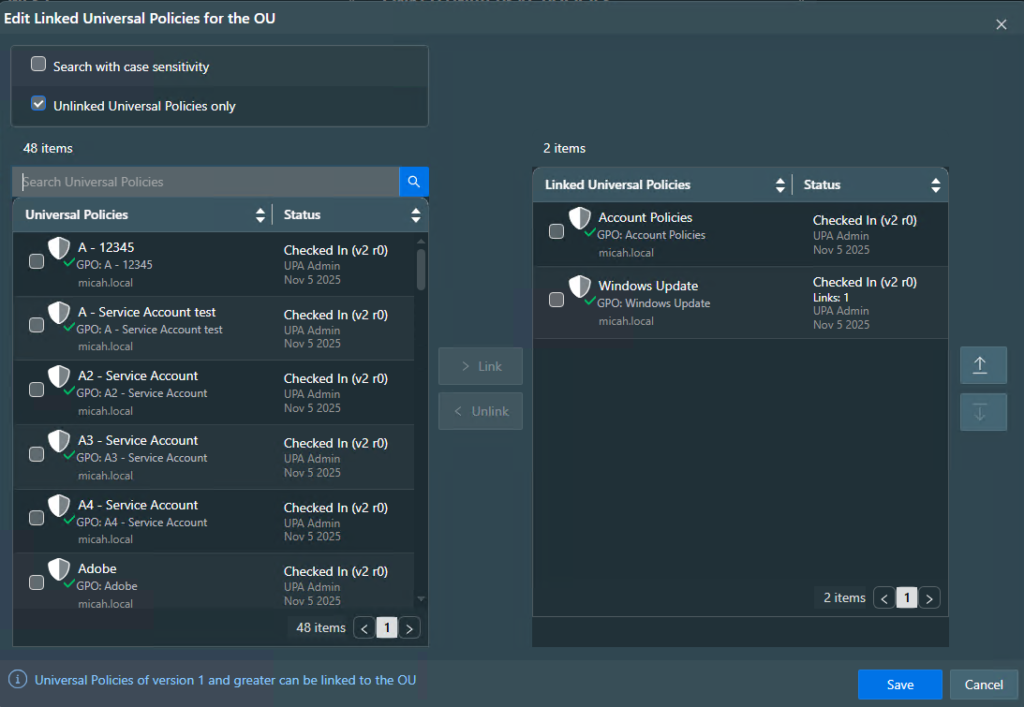
Please Note: Only Universal Policies with release versions > 1 are available to link in the Edit Linked Universal Policies for the OU dialog box.