
Universal Policy Administrator Documentation
Settings Report
You can view settings report for Universal Policies. This helps administrators quickly access and review the settings of any Universal Policy, ensuring effective policy management.
To view Universal Policy Settings Report in the Web Console:
- Navigate to the Universal Policies tab.
- Select a Universal Policy.
- Click Settings to open the Settings Report tab.
- In the Settings Report tab, click on the release of the Universal Policy.
- View the Universal Policy Settings Report.
- Click Share Report to print or save the report to a pdf.
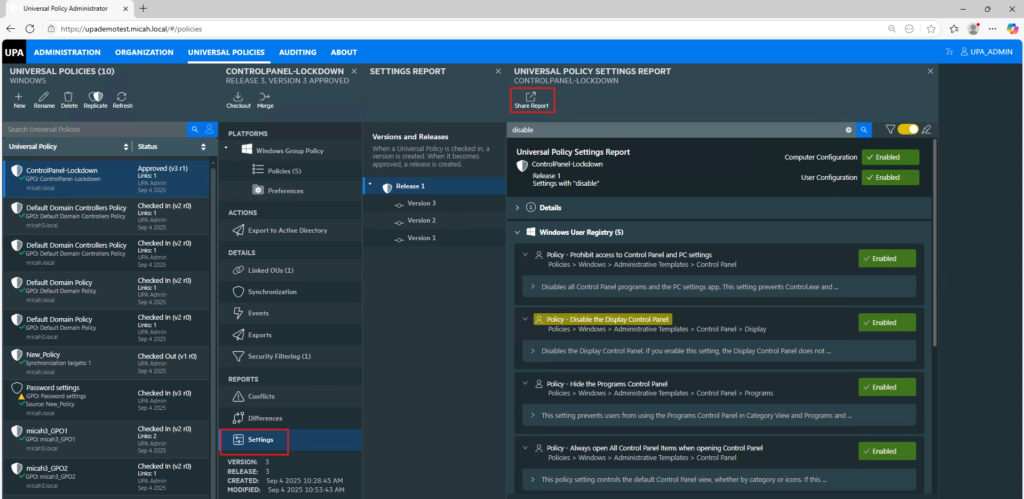
To Search Specific Settings in the Universal Policy Settings Report in the Web Console:
- In the Settings Report tab, navigate to the search bar.
- Click on the search bar to activate it.
- Type in the keyword or setting name you are looking for.
- Press Enter or click on the search icon to initiate the search.
- Review the search results to find the relevant setting (The keywords are highlighted).
To Share Universal Policy Settings in the Web Console:
- In the Settings Report tab, click on the Share Report icon, a print dialog box will appear.
- Choose Save as PDF or select the PDF printer option from the list of available printers.
- Click the Print or Save button. A new dialog box will prompt you to choose the destination where you want to save the PDF file.
- Select the desired location on your device and enter a file name for the PDF.
- Click Save to generate the report as a PDF file.