UPA Administration and Delegation
The delegation model in UPA enables you to configure what operations users can perform and what they can view inside of UPA. In the Administrator tab there are three nodes: Roles, Views, and Assignments.
You can use these three nodes to:
- Select users and assign them to the roles on the view that you have defined
- Define access roles, using built-in or custom roles
- Create a view and define the scope of permissions
Please watch this video as an overview:
We have created a pre-defined set of Roles as a starting point. You can edit these Roles or create new Roles depending on your requirements.
The 4 Roles are:
- Full Administrator – Administer, delegate, manage, audit the UPA system
- Editor – Create, edit, submit policies for approval
- Approver – Review, approve, reject, export policies
- Reviewer – View and audit policies and history of events
The chart below shows the default Permissions for the pre-defined Roles.
| Role Permission | Full Admin | Editor | Approver | Reviewer |
|---|---|---|---|---|
| Approve UP | Yes | Yes | ||
| Audit | Yes | Yes | Yes | Yes |
| Create GPO | Yes | Yes | ||
| Create New Domain | Yes | |||
| Create OU | Yes | Yes | Yes | |
| Create UP | Yes | Yes | Yes | |
| Delete AD | Yes | |||
| Delete Domain | Yes | |||
| Delete GPO | Yes | Yes | ||
| Delete OU | Yes | Yes | Yes | |
| Delete UP | Yes | Yes | Yes | |
| Edit Domain Maps | Yes | Yes | Yes | |
| Export to AD | Yes | Yes | ||
| Import from AD | Yes | Yes | Yes | |
| Modify AD | Yes | |||
| Modify Delegation | Yes | |||
| Modify GPO | Yes | Yes | ||
| Modify UP | Yes | Yes | Yes | |
| Modify UP Links | Yes | Yes | Yes | |
| Rename OU | Yes | Yes | Yes | |
| Rename UP | Yes | Yes | Yes | |
| Replicate | Yes | Yes | Yes | |
| Rollback | Yes | Yes | Yes | |
| Submit UP For Approval | Yes | Yes | Yes | |
| Undo Checkout | Yes | Yes | Yes | |
| View AD | Yes | Yes | Yes | Yes |
| View Delegation | Yes | Yes | Yes | Yes |
| View GPO | Yes | Yes | Yes | Yes |
| View OU | Yes | Yes | Yes | Yes |
| View UP | Yes | Yes | Yes | Yes |
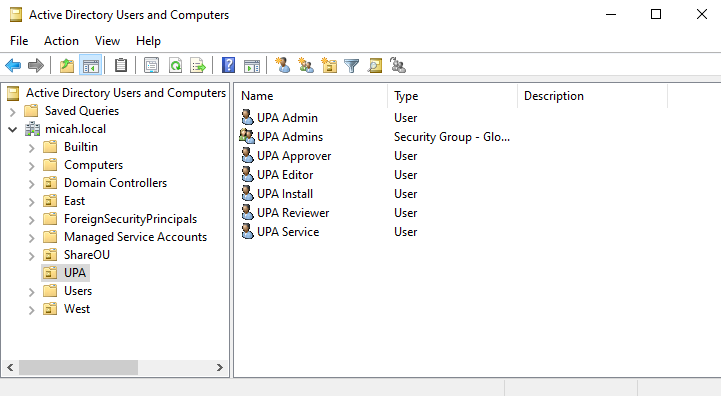
To begin working with the pre-defined Roles, you will need to create the appropriate Users/Groups in Active Directory (or Microsoft Entra ID, etc.) and then go to Assignments and configure the Role, View, and include the appropriate Users/Groups. See Creating and Editing Assignments for detailed instructions.
Please watch this video for an overview of how to work with the pre-configured Roles: