
Universal Policy Administrator Documentation
-
Introduction to Universal Policy Administrator
-
Installing Universal Policy Administrator
-
Setting up UPA Delegation
-
Working with Universal Policies
- Intro to Working with Universal Policies
- Creating Universal Policies
- Adding and Editing Policies
- Approving Universal Policies
- Exporting Universal Policies and Updating OU Links
- Merging Policies
- Rolling Back Policies
- Replicating Policies
- Synchronizing Policies (Gold Policy)
- Managing Security Filtering
- Working with ADMX Templates
-
Working with Domains and OUs
-
Reporting on Universal Policies
-
UPA Configuration Settings
- Configuring SAML Authentication via Microsoft ENTRA ID
- Configuring UPA to use a Third-Party Identity Provider
- Configuring OIDC Authentication with OKTA
- Configuring OIDC Authentication with Microsoft Entra ID
- Configuring SAML authentication with Okta
- Configuring the Universal Policy Administrator Syslog Provider
-
Appendix
< All Topics
Print
Architecture
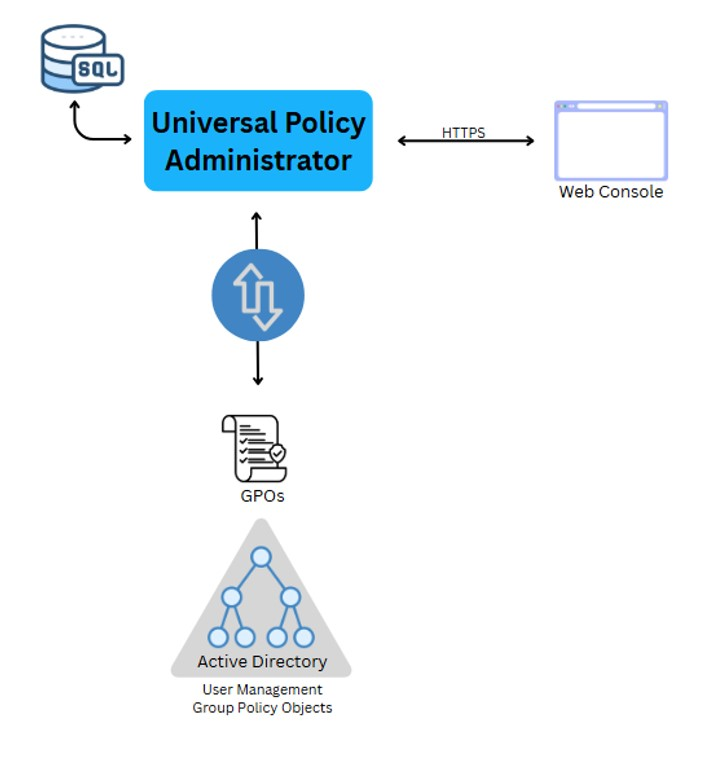
UPA connects to your live Active Directory environment and imports your GPOs and OUs where any changes are made in an offline, secure environment. The policies are stored in a Microsoft SQL database. UPA users are configured to edit, approve, review, and manage the policies from a web based console. Upon approval, the policies are exported back to Active Directory.
In This Article