
Universal Policy Administrator Documentation
RSoP Analysis Reports
To view RSoP Analysis Reports in the web console:
- Log in to the Web Console as an Administrator, navigate to the Organization tab.
- (Optional) Select a Domain OU with Universal Policies assigned and click RSoP Report and Planning.
- View the RSoP Report.
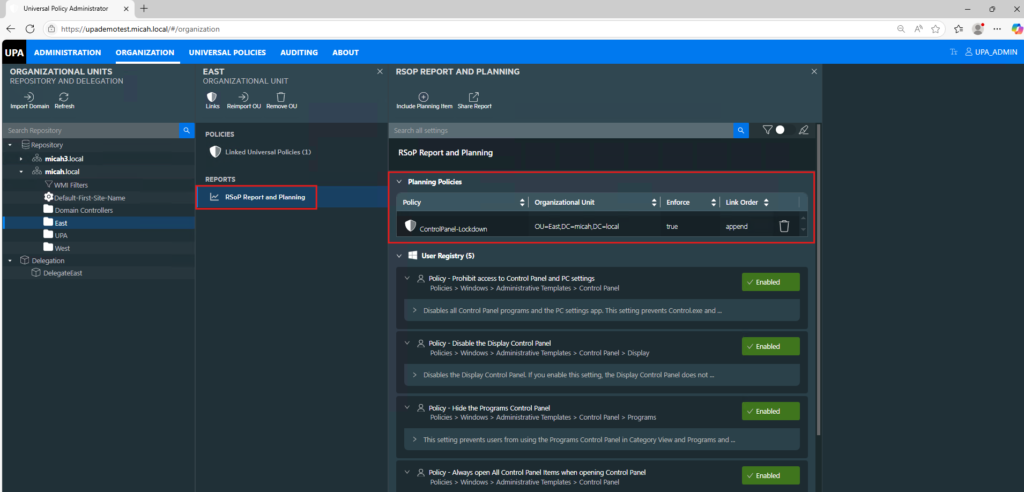
Adding and Viewing RSoP Planning Reports
You can add and view RSoP planning reports that allow simulating links for Domain OUs.
- Log in to the Web Console as an Administrator and navigate to the Organization tab.
- Select a Domain OU with Universal Policies assigned and click RSoP Report and Planning.
- To add new simulating link, click Include Planning Item and select the following values:
- A universal policy to simulate linking to OU.
- The target OU for the simulated link.
- Clear the Enforced Settings check box.
- (Optional) Specify a link order for the policy to be included in the link list.
NOTE: You can see both simulated and the linked policies in the Contributed Policies section.