
Agent Isolation
Applies to SSHepherd 2.0
Overview
Agent isolation lets you cut off access to a host straight away, for example while you investigate a security alert, without uninstalling the Agent or changing groups. Each agent has an Availability setting with three modes:
| Mode | Who can connect | Agent-to-Agent tunnels |
|---|---|---|
| Normal | Users in the agent’s groups, and administrators. | Work normally. |
| Isolated with Admin Access | Only users with the connect-admin-isolated-tunnel permission, such as administrators. | Stopped, both from and to the agent. |
| Fully Isolated | Nobody, including administrators. | Stopped, both from and to the agent. |
When you isolate an agent:
- Running sessions end immediately, including the sessions of users who are still allowed in. They can connect again afterwards if the mode allows them.
- New connections are refused. Users see “Tunnel error: Agent is in full isolation mode”, or, for Isolated with Admin Access, a message that they don’t have the connect-admin-isolated-tunnel permission.
- The agent stays connected to the C3 server, so you can return it to Normal at any time. The agent briefly disconnects and reconnects while isolation is applied, and after a restart it stays isolated.
When you return an agent to Normal, access and Agent-to-Agent tunnels come back within seconds, with no Agent restart.
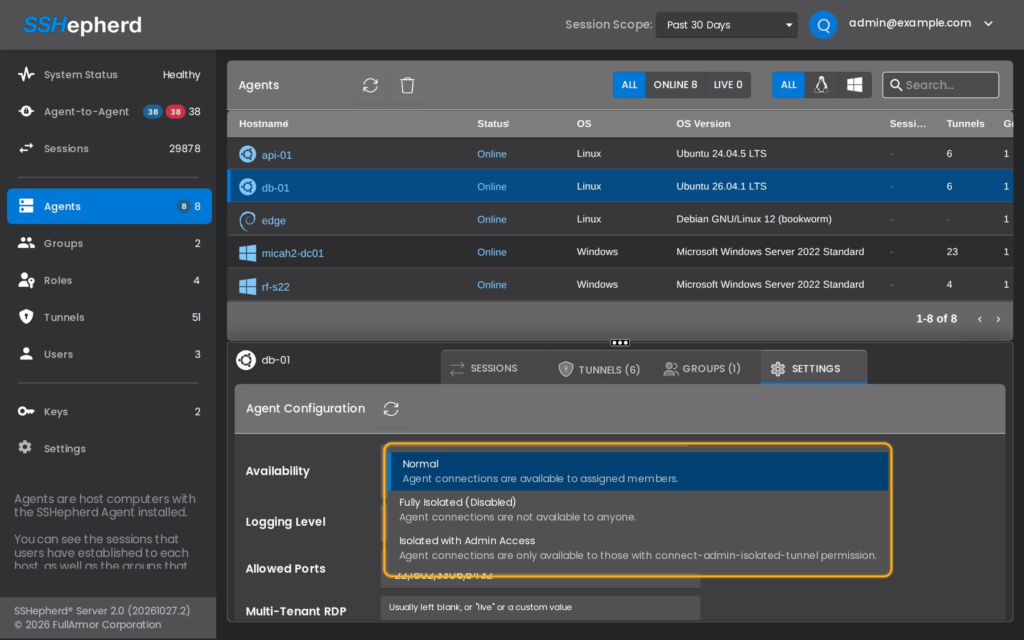
Isolate an agent in the Administrator Console
- Click Agents and select the agent.
- Click the Settings tab.
- In Availability, choose Isolated with Admin Access or Fully Isolated.
- Click Save.
To end isolation, set Availability back to Normal and click Save.
You need the modify-agent-config permission.
Tip: The Agents list shows an isolated agent as online. To see an agent’s isolation mode, open its Settings tab.
Isolate an agent from a security tool
To isolate agents automatically, for example from a SIEM or SOAR playbook, create a Full Isolation or Admin Isolation API key and call the C3 API with it:
curl -X PUT https://your.sshepherd.server/api/apikey/isolate/full/<agent id> -H "Authorization: Bearer <api key>" -H "Content-Type: application/json" -d "{}"See API Keys for both calls and their responses.
Who can connect to an agent in Admin Access mode
Users need the connect-admin-isolated-tunnel permission. The built-in admin role has it. To let a smaller team, such as an incident response team, reach isolated agents, create a role with this permission and the tunnel permissions they need. See Managing Roles.