
Get to know SSHepherd®
Applies to SSHepherd® 2.0
Overview
SSHepherd® is a cybersecurity product that removes some of the attack vectors hackers try most often: Remote Desktop Protocol (RDP), Secure Shell (SSH) and TCP/IP application ports. These protocols use open, listening ports that can be scanned. SSHepherd® lets you close those ports so the servers appear offline, while authorized users, applications and DevOps tools can still reach them. Users keep their existing tools, such as an ssh client, Remote Desktop or a database client, and connect through the SSHepherd® Control App or the command-line interface (CLI).
By closing the ports and providing a controlled way in, SSHepherd® helps you:
- End unwanted sessions immediately with a real-time kill switch.
- Reduce security alerts from scans and brute-force attempts.
- Control which users can reach which hosts.
- Monitor, record and audit SSH and RDP sessions.
What you can connect to
SSHepherd® 2.0 supports these tunnel types:
| Tunnel type | What it’s for |
|---|---|
| SSH | Terminal sessions and file copies (SCP) to Linux and Windows hosts. |
| RDP | Remote Desktop sessions to Windows hosts. |
| Generic | Any TCP/IP application, such as a web server, database or Telnet service. In SSHepherd 1.x this was called “Other App”. |
| Agent-to-Agent (A2A) | A permanent link from one or more agents to a service behind another agent, with no user involved. New in 2.0. |
Administrators can also save tunnels as tunnel definitions and give them to users or groups. See What’s New in 2.0 for everything that changed since 1.x.
Architecture
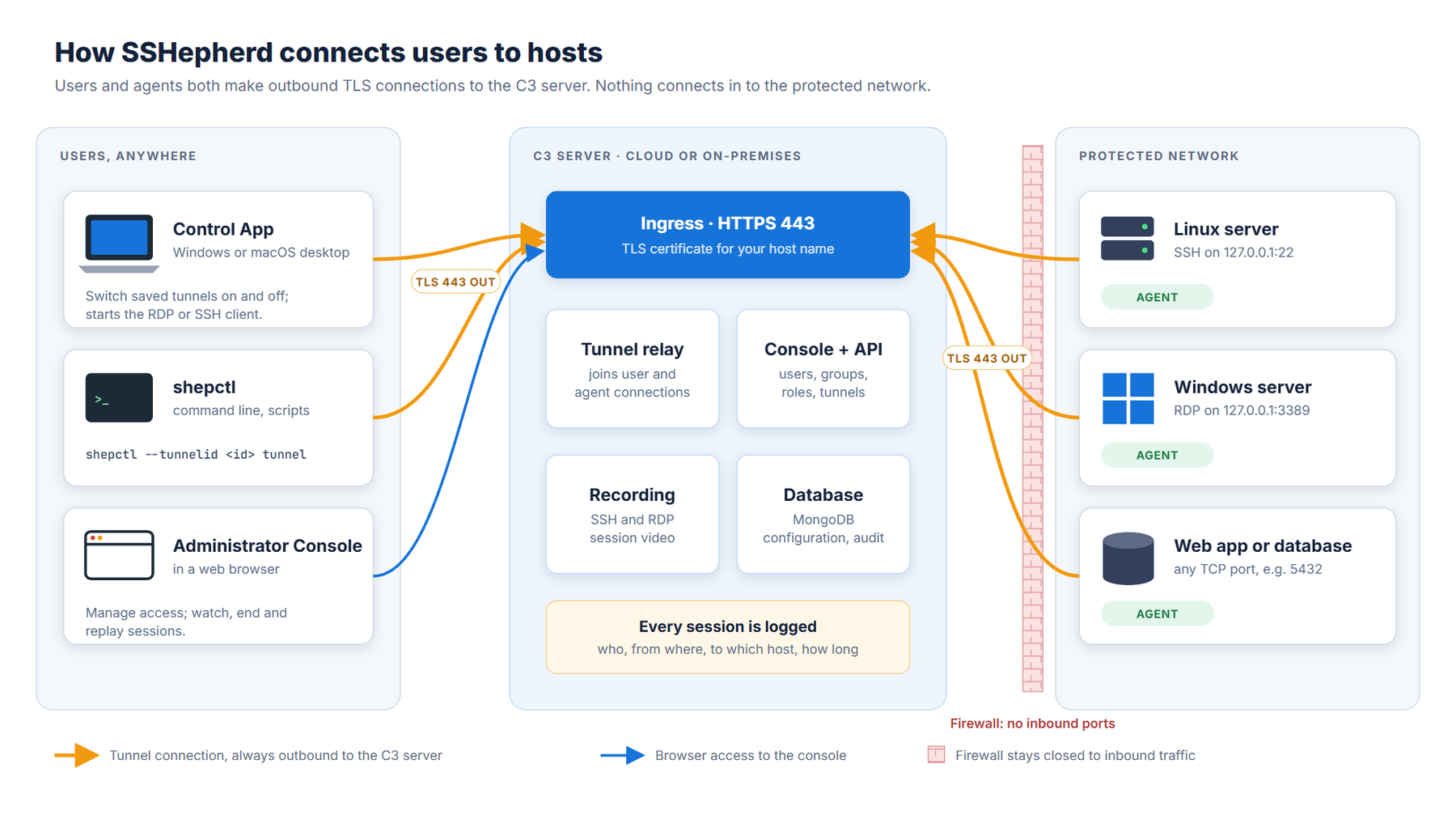
SSHepherd® has three components:
- The Control App and CLI (shepctl). Users run these on their own computers to sign in and open tunnels. The Control App is a desktop application; shepctl is the command-line tool. Both run on Windows and Linux.
- The Command-and-Control (C3) server. The C3 server runs on Kubernetes. Agents and clients connect to it, and it joins each client’s connection to the right agent. It also hosts the web-based Administrator Console, where you manage users, groups, roles, agents and tunnels, and where session recordings are stored and played back.
- The Agent (shepagent). You install the Agent on each host you want to protect. The Agent makes an outbound connection to the C3 server, so the host needs no open inbound ports.
SSHepherd® uses its own websocket protocol to set up a tunnel between the client and the Agent when no ports are open. The
Demo Videos
Below you will find a few quick demos of SSHepherd® in action.
Next steps
- Check the System Requirements.
- Install the C3 server.
- Install the Agent on the hosts you want to protect.
- Install the Control App and CLI for your users.