
Monitoring Sessions
Applies to SSHepherd 2.0
Overview
A session is a connection that a user, or an Agent-to-Agent tunnel, makes to an agent through SSHepherd®. The Sessions page is the home page of the Administrator Console. It shows each session as Live while it’s running and Finished when it has ended. You can watch live sessions, end unwanted ones immediately, and play back recordings.
To see the Sessions page you need the list-recording permission. Users with only the built-in user role don’t see it.
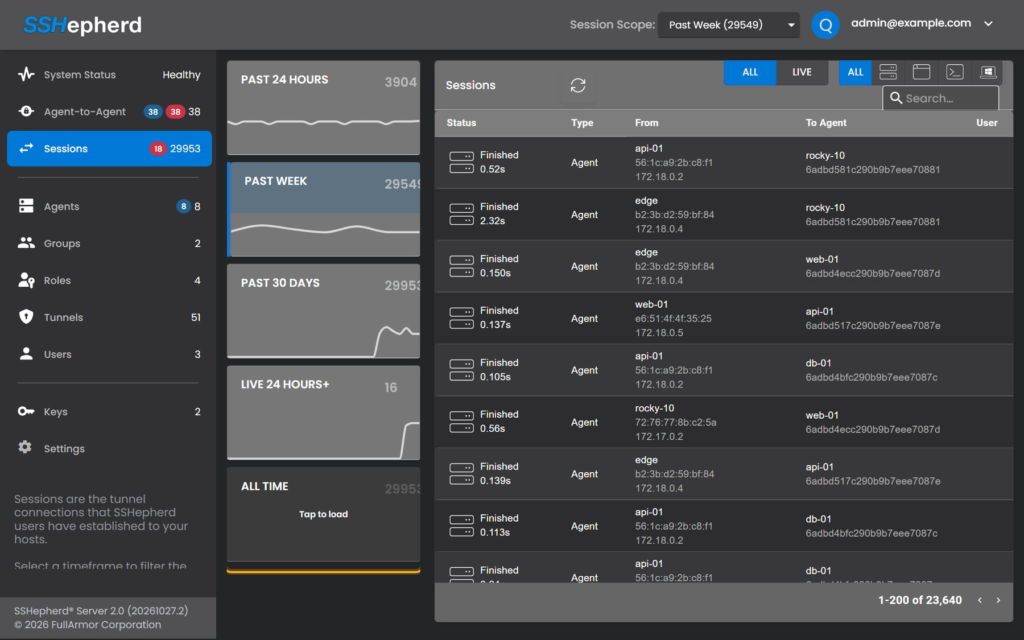
The Sessions page
Time tiles
The tiles at the top count sessions for Past 24 Hours, Past Week, Past 30 Days, Live 24 Hours+ (sessions running for more than a day) and All Time. Click a tile to show those sessions in the list. All Time loads when you tap it.
The session list
Each row shows the session’s status, type, the client it came from, the agent it went to, the user, the data transferred, and its start and end times.
- Filter by type: Agent (Agent-to-Agent), Generic, SSH or RDP.
- Search, for example by agent name.
- Click a column heading to sort.
- Click the refresh icon to load new sessions. The page doesn’t update by itself.
Notes:
- RDP logins appear twice: a short session of about 20 seconds while the user signs in, followed by the actual desktop session.
- Agent-to-Agent sessions have type Agent and no user. Every connection through an A2A tunnel is a separate session, so a busy A2A link adds many rows.
Session details
Select a session to see its details:
- The user, and the agent.
- The client computer’s host name, IP address and MAC address.
- The data sent in each direction.
- Start and end times.
- The recording, if there is one. See Session Recording.
Watch a live session
- On the Sessions page, filter by Live, or find the session marked Live.
- Select it. The detail panel shows the session as it happens (“Streaming Live Session”).
Only recorded session types (SSH and RDP, on agents with recording on) can be watched.
End a session
If you see unwanted behavior, end the session straight away:
- Select the live session.
- Click Terminate.
- Confirm.
The user’s connection closes at once, and the session gets an end time. You need the terminate-tunnel permission.
With shepctl, using the session’s ID from shepctl list-recording:
shepctl --recordingid <session id> terminate-tunnelFrom shepctl, you need both terminate-tunnel and list-recording.
List sessions with shepctl
shepctl list-recordingNarrow the list by time, agent or user:
shepctl --start 2026-01-01T00:00:00 --end 2026-01-31T23:59:59 list-recording
shepctl --hostid <host id> list-recording
shepctl --user jane.doe@example.com list-recording
A session that is still running has no end time (ended_on).
Keeping session history
Important: Session history is deleted with the account or agent it belongs to:
- Deleting a user deletes all of that user’s sessions and recordings.
- Removing an agent deletes all its sessions and recordings.
Recordings can’t be deleted individually. If you need sessions for auditing, keep the user (remove their roles and groups instead) and keep the agent record (an offline agent does no harm).